ATS-friendly resume: what applicant tracking systems read
How applicant tracking systems parse a resume, the formatting rules that keep yours readable, and a worked example of tailoring keywords to a job post.
An ATS-friendly resume is one an applicant tracking system can turn into clean, correctly labeled text: a single column, standard section headings, real text instead of images, and wording that matches the job post. Many employers collect applications through an ATS, so the file you upload is usually read by software before a recruiter searches, filters or opens it. This guide explains what that software actually reads, the formatting rules that matter, how to tailor keywords with a worked example, and a checklist to run before you hit submit.
One thing up front: no template or tool can promise your resume will "beat the ATS." Employers use different systems with different settings, and people still make the decisions. What you control is whether your resume is easy to read for both.
How does an ATS read your resume?
An applicant tracking system is the software employers use to post jobs, collect applications and move candidates through the hiring process. When you upload a resume, the system extracts the text and tries to sort it into fields: name, contact details, job titles, employers, dates, education and skills. Recruiters can then search and filter candidates by those fields and by the terms they care about.
The University of Pittsburgh's career center describes it as software that parses your document and extracts key data such as names, job titles and education. The University of Missouri–St. Louis goes a step further in its ATS guide: the system converts your file to plain text, and tabs, text boxes, tables, color, pictures and graphs don't survive that conversion.
In practice:
- Reads reliably: plain paragraphs, bulleted lists, conventional headings ("Experience," "Education"), clearly written dates.
- Often goes wrong: two- or three-column layouts, information arranged in tables, text boxes, contact details in the page header or footer, icons standing in for words, skill bars and star ratings.
- Isn't read at all: text saved as an image. A scanned PDF, or a resume exported as a picture from a design tool, looks like a blank page to the parser.
With columns, the bigger risk isn't that nothing gets read; it's that things get read in the wrong order. A parser that reads straight across the page can glue "Spanish – fluent" from your sidebar onto the end of your job title.
What formatting rules keep a resume ATS-friendly?
Think of it as structure over decoration.
- Use one column. The reading order should run top to bottom with no detours.
- Use standard section headings. "Experience" (or "Work Experience"), "Education," "Skills," "Certifications," "Projects." Clever headings like "Where I've been" make it harder for the system to map sections to fields.
- Skip tables, text boxes and graphics. Write skill levels in words: "Spanish (professional working proficiency)," "Excel (advanced)."
- Keep contact details in the body. Name, phone, email, city and state, and LinkedIn URL go at the top of the page as normal text, not in the header.
- Choose a common font. Arial, Calibri or Times New Roman at 10–12 pt. Decorative fonts can turn into garbled characters.
- Format dates consistently. "Mar 2023 – Aug 2025" or "03/2023 – 08/2025," and the same style throughout.
- Send the file type the application asks for. If the form specifies DOCX or PDF, use that. If it doesn't, a text-based PDF is usually a safe choice. Create it with "Save as PDF" or "Export" from your word processor, not by printing to PDF or taking a screenshot.
- Name the file sensibly.
firstname-lastname-resume.pdf, notresume_final_FINAL2.pdf.
The two-minute test
How do you tailor resume keywords to a job post?
Recruiters typically search an ATS for the skills, tools and job titles in their own posting. You don't need a new resume for every application, but you do need to map the job post's language onto experience you actually have.
- Read the posting and mark the skills, tools, certifications and titles that appear in the requirements or come up more than once.
- Next to each one, note whether your resume already covers it, covers it in different words, or doesn't cover it.
- Rewrite the "different words" items using the posting's terms. Don't add skills you don't have.
- Work the terms into your experience bullets, not only your skills list. A keyword in context is more convincing to a recruiter than a keyword in a pile.
Worked example: a fictional marketing coordinator role
Job post (fictional): Example Corp – Marketing Coordinator. You'll manage our content calendar, run email marketing campaigns, report on performance in Google Analytics 4, and work with sales and product on launches. Experience with a CRM and basic HTML is a plus.
Terms pulled from the post: content calendar, email marketing, campaigns, Google Analytics 4, reporting, cross-team launches, CRM, HTML.
Before:
- Handled the company's social media and newsletters.
- Helped with marketing for new product releases.
- Skills: social media, writing, analytics
After:
- Managed a monthly content calendar across email, LinkedIn and the company blog for a team of [X] people.
- Ran bi-weekly email marketing campaigns to [X] subscribers; reported open and click rates in Google Analytics 4 and a CRM dashboard.
- Coordinated launch campaigns for [X] product releases with the sales and product teams.
- Skills: email marketing, Google Analytics 4, CRM, content calendar planning, copywriting, basic HTML
What changed: "newsletters" became "email marketing campaigns," the phrase the posting uses. "Analytics" became the specific tool they named. "Helped with marketing" turned into a bullet that shows the cross-team work the role asks for. Replace each [X] with your real numbers. If you don't have a number, describe the scope plainly instead of inventing one; a made-up metric tends to fall apart in the first interview question.
For acronyms, spell the term out once with the acronym in parentheses, as in "customer relationship management (CRM)" or "search engine optimization (SEO)." That way you match whichever version a recruiter types.
How should each section of the resume look?
Header: Full name, phone, email, city and state (or city and country if you're applying abroad), LinkedIn URL. In the US and UK, leave out your photo, date of birth and marital status; employers generally don't expect them, and a photo adds nothing a parser can read.
Summary (2–3 lines): Who you are, how much experience you have, and the role you're targeting. Using the posting's job title here helps: "Marketing coordinator with three years in B2B email and content marketing."
Experience: For each role, put job title, employer, location and dates on their own lines, then 3–5 bullets. A reliable bullet pattern is what you did + how or with what + the result. Lead with a strong verb and quantify where you honestly can.
Education: School, degree, graduation year. Recent graduates can add relevant coursework, a capstone project or GPA if it's strong.
Skills: A short, comma-separated list, or a few labeled groups ("Tools," "Languages"). Use commas rather than vertical bars or icons.
Certifications and projects: Under their own standard headings, with the issuing body and year.
Length: In the US, one page is typical early in your career and two pages is common with more experience. In the UK, where the document is usually called a CV, two pages is the norm.
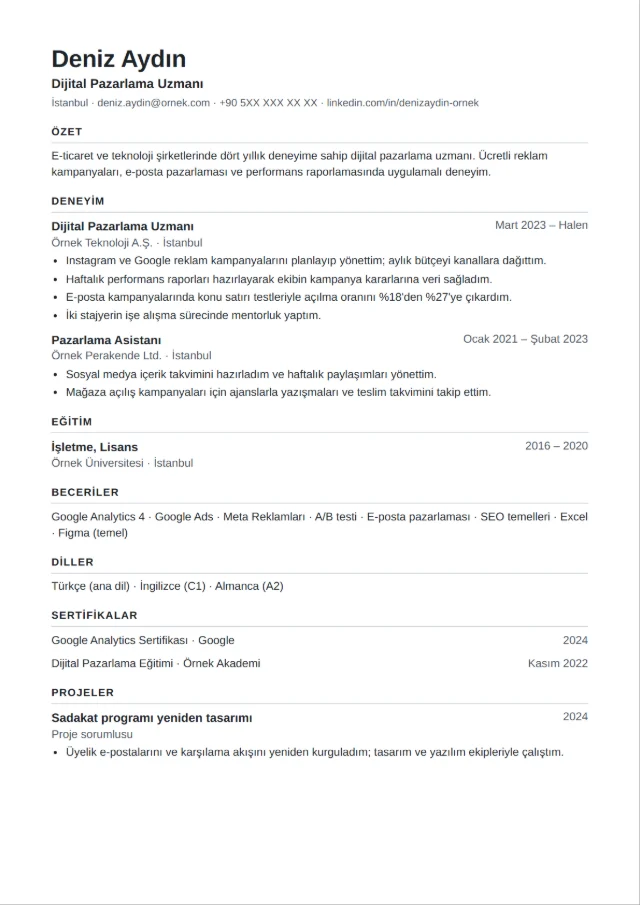
If you'd rather not fight with formatting, starting from a clean one-column template saves time. Kivilio CV is an AI-assisted resume builder with 17 templates, 4 of them on the Free plan. Word downloads are made of real paragraphs and PDFs have selectable text, so you can run the copy-and-paste test yourself, and your first resume downloads without a watermark. You can compare layouts on the resume templates page.
What common mistakes make a resume hard to parse?
- Sending one generic resume everywhere. Even with perfect formatting, a resume that doesn't use the posting's language won't surface in a recruiter's search.
- Keyword stuffing. Hiding the posting's text in white font or piling every term into the skills section won't fool the person who reads it next.
- Exporting from a design tool as an image. It looks polished on screen and contains no text.
- Putting key details in headers, footers or sidebars. Your name and email are the worst things to lose.
- Inconsistent dates and unexplained gaps. Pick one date format; a brief line can explain a career break.
- Only using the acronym, or only the full term. If the post says "project management" and you only wrote "PM," you may miss the match.
What should you check before you submit?
- Layout is a single column with no tables, text boxes or graphics.
- Section headings are standard: Experience, Education, Skills, Certifications.
- Contact details are in the body, at the top.
- The 5–8 most important skills or tools from the post appear in your experience bullets, where they're true for you.
- Every role has a title, employer and dates, in one consistent date format.
- The file type matches what the application asks for, and the PDF passes the copy-and-paste test.
- The file name is
firstname-lastname-resume. - You've proofread it out loud, or someone else has.
Frequently asked questions
Is an ATS resume template enough?
No. A template fixes structure; matching content and clear bullets are still on you. A clean template lowers the risk of a well-written resume being read out of order, and that's all it can do.
Should I submit a PDF or a Word document?
Follow the application first. If it doesn't say, a text-based PDF is usually fine. Some employers and recruiters ask for DOCX so they can edit or reformat it, so keep both versions ready.
Do I need a different resume for every job?
You need a tailored resume, not a new one. Keep a master version with everything, then adjust the summary, the order of bullets and the wording of key skills for each posting. Once the master version is solid, each round of tailoring gets much faster.
Can I use color or icons?
A touch of color in headings is generally harmless. The problem is when color or icons carry information, like a phone icon with no label or a skill shown only as a bar. Keep every fact in plain words.
Kivilio newsletter
New articles, product news and short tips.